Introduction
The HP Workforce Experience Platform (WXP) is a cloud-based solution that helps IT administrators to monitor, manage, and improve digital employee experiences across devices and applications.
It offers visibility into device performance, application usage, system health, and user sentiment. In addition, supports automated remediations, survey delivery, and third-party integrations.
WXP enables you to:
Monitor your IT environment in real time.
Resolve issues using AI-based alerts and automation.
Track user feedback through sentiment surveys.
Integrate with platforms, such as Microsoft Intune, Power BI, ServiceNow, and Tableau.
Accessing WXP Features
Log in to WXP. The WXP Navigator tab is displayed.
The Home page view varies by subscription plan. The below image shows the Home page for the WXP Navigator Pro and Elite subscriptions.
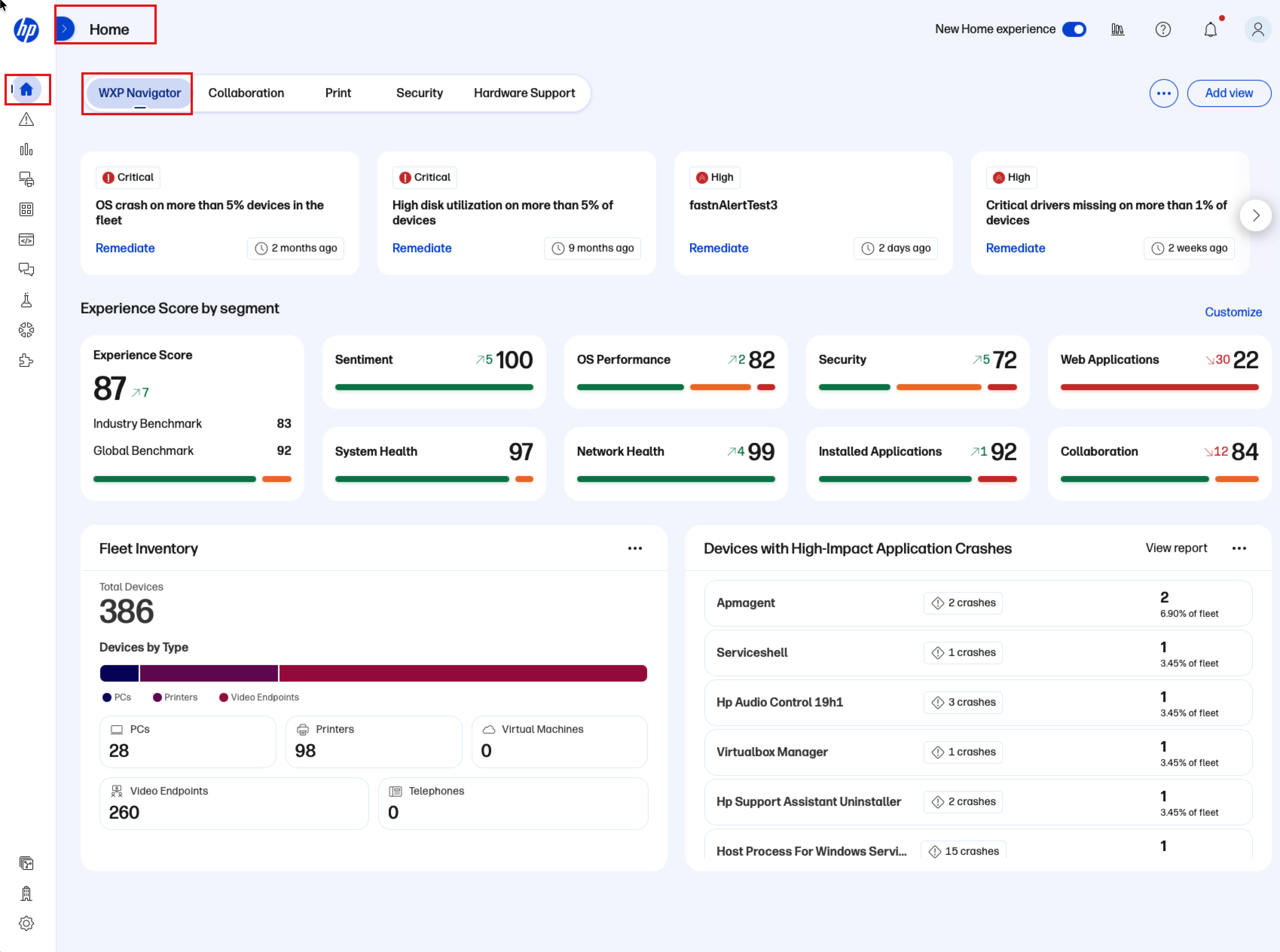
Use the left navigation menu to access the required module or feature.
Core Features and Functionalities
Some of the core features and functionalities include:
Home page
View device and experience metrics, performance scores, and user feedback.
Alerts
Monitor real-time alerts categorized by severity with recommended actions.
Analytics
Access built-in and custom reports to evaluate system and application performance.
Devices
Add, manage, and view inventory and performance data for all devices.
Pulses
Create and manage employee sentiment surveys and maintenance notifications.
Groups
Organize devices into static, dynamic, or Entra ID–synced groups to implement targeted remediations.
Remediation
Automate device fixes using scripts, policies, and secure secrets. Also, view and analyze remeditation activities.
Labs
Try new features, including AI tools and workflow automation, and share feedback with HP.
Integration
Integrate with third-party tools and services to enhance productivity, streamline workflows, and unlock new possibilities for your workforce.
Settings
Configure roles, preferences, alerts, delivery locations, and partner access.
Account Management
Manage company details, admin contacts, and platform user accounts.
Hardware Support
Manage the hardware alerts and incidents that are recorded for devices with the HP Premium, Premium+, or Active Care services. The Hardware Support page displays all predictive detection alerts, such as Battery Needs Attention, HDD Predictive Failure, and Fan Warning or Fan Critical for devices covered under HP Premium, Premium+, or Active Care services. It also lists incidents created when an IT administrator manually opens a hardware repair case in WXP.
Note: The Hardware Support Dashboard is available for accounts with Active Care or Premium/Premium Support. Companies with more than 50 PCs can also request the dashboard to view all devices and centrally manage alerts and repair cases.
Poly Lens
Connect your Poly Lens Cloud account to WXP to monitor collaboration devices and rooms, update device software, and troubleshoot issues.
Add-ons
Explore WXP add-ons such as HP Wolf Security to help protect PCs and Poly Lens to monitor and manage collaboration devices and rooms.
WXP Collaboration
Monitor call and meeting quality across Microsoft Teams, Zoom, and Webex. Use dashboards and reports to identify performance issues.
Contact Us
For assistance, create a support case or email support@wxp.hp.com.